Contracts Management
Gateways onboarding flows
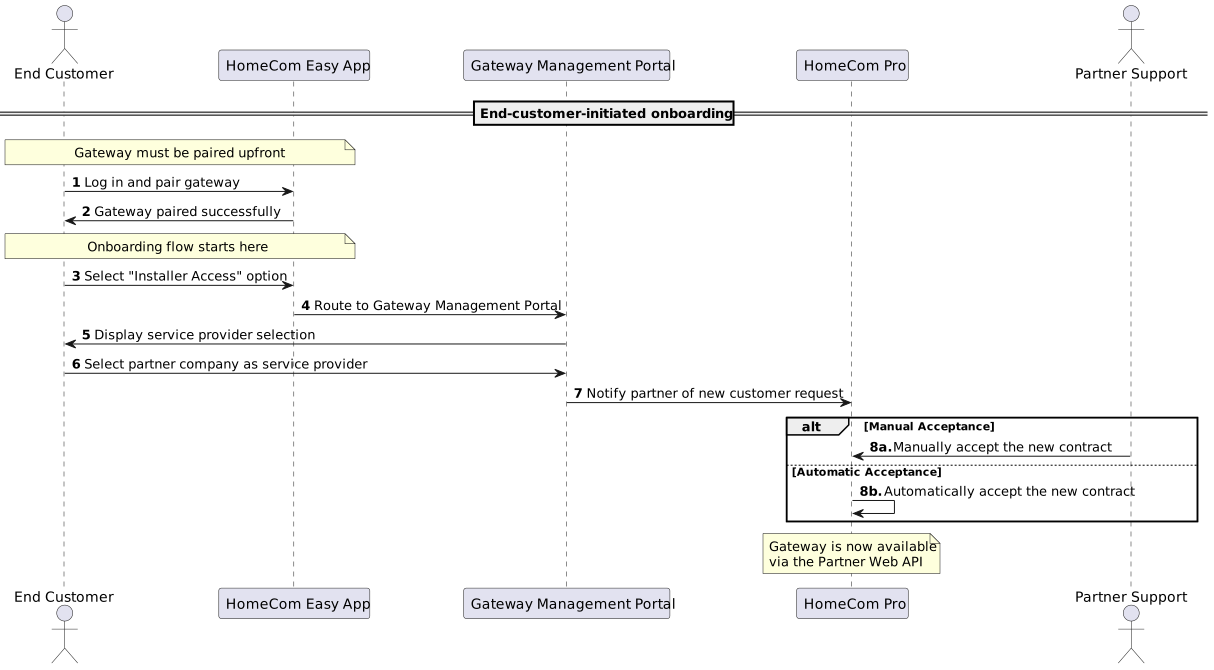
End-customer-initiated onboarding
After pairing the appliance with the HomeCom Easy app, the end-customer can select the "Installer Access" option under their devices in the app. This action routes to the Gateway Management Portal, where a service provider can be selected to share appliance access.
After the end-customer has selected the partner company, the partner has two options:
- Manually accept the new contract in HomeCom Pro. This is the default option.
- Automatically accept the new contract. To enable this option, please contact the Partner Web API Team, through the existing contact channels.
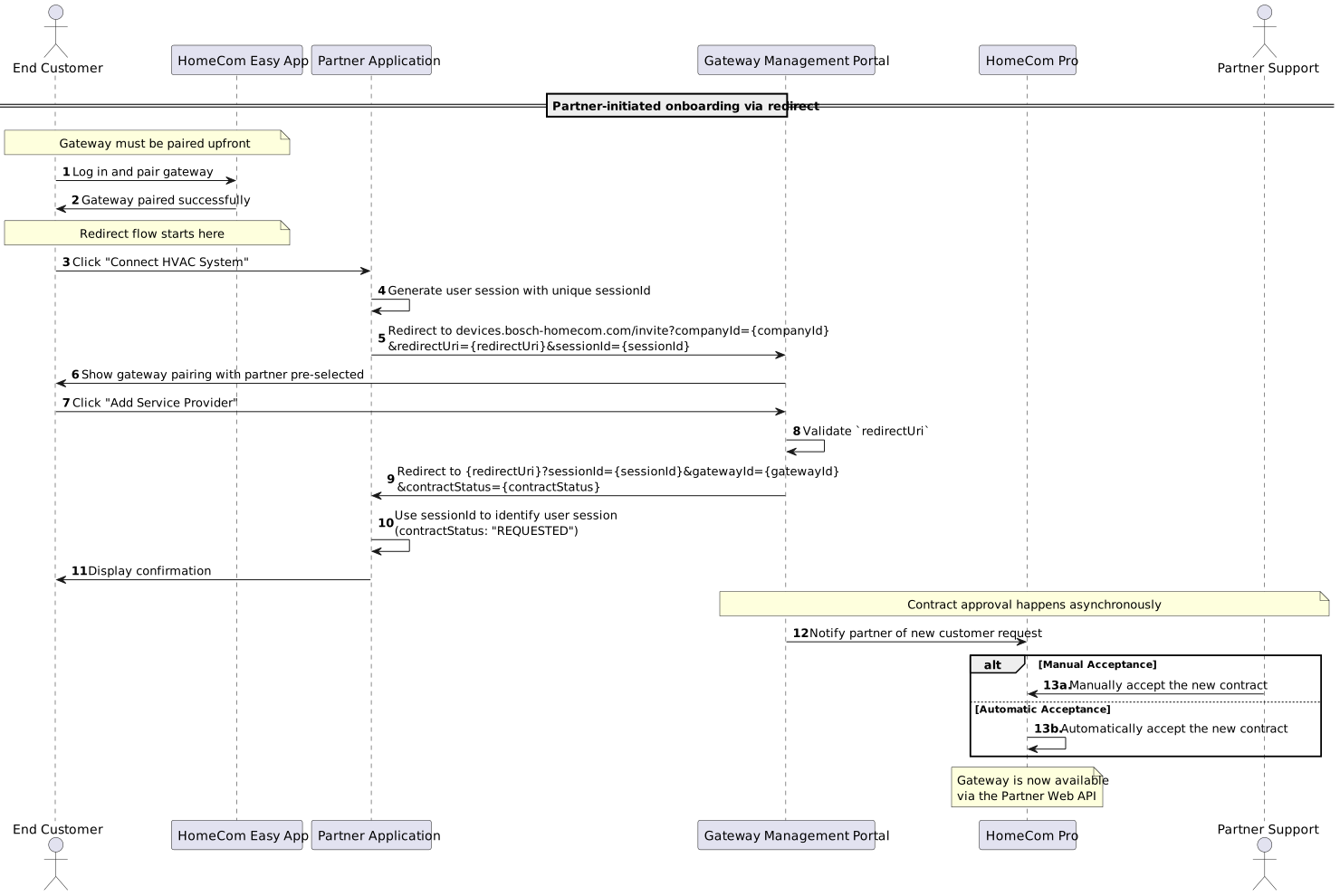
Partner-initiated onboarding via redirect
The partner integrates a direct link in their solution that redirects end-customers to the Gateway Management Portal with additional information (companyId, redirectUri, and sessionId).
After the end-customer shares the appliance, they are redirected back to the partner's redirect URI with further details (gatewayId and contractStatus).
The partner must accept the new contract, either manually in HomeCom Pro, or automatically by contacting the
Partner Web API Team to enable this option.
Precondition
One or more redirect URIs must be shared with Bosch during partner onboarding and will be validated against a whitelist for security purposes.
Gateway Management Portal links by brand
- Bosch:
https://devices.bosch-homecom.com/invite?companyId={companyId}&redirectUri={redirectUri}&sessionId={sessionId} - Buderus:
https://devices.buderus-connect.de/invite?companyId={companyId}&redirectUri={redirectUri}&sessionId={sessionId} - IVT:
https://devices.ivt-connect.com/invite?companyId={companyId}&redirectUri={redirectUri}&sessionId={sessionId}
Required parameters
companyId: Partner company identifier (retrieve viaGET /api-keys/meendpoint or contact support)redirectUri: Callback URI where end-customers will be redirected after adding the service providersessionId: Session token to identify the user session
NOTE: Avoid sending complex objects (e.g. in JSON notation) via the
sessionIdparameter. Due to security reasons such values will be deformed by sanitization.
Partner-initiated onboarding via email
The partner company sends an invitation via HomeCom Pro. The end-customer receives an email with a link to the Gateway Management Portal, where the appliance can be shared with the pre-selected service provider. After the end-customer has selected the partner company, the partner must accept the new contract, either manually in HomeCom Pro, or automatically by contacting the Partner Web API Team to enable this option.
On behalf of the end-customer
For end-customers who do not use the HomeCom Easy app, the partner company establishes the connection in HomeCom Pro on behalf of the end-customer. The end-customer provides authorization by signing a consent form, allowing the partner company to access the appliance. The signed consent form (PDF) must be uploaded during this process.
Optional end customer identifier
For all onboarding methods, an optional end customer identifier can be set in HomeCom Pro. This identifier is returned in the Partner API as the partnerUserId field on the /contracts/{gatewayId} endpoint and can assist with customer identification in later processes.
Gateway contract management via Partner API
Using the PATCH /contracts/{gatewayId} endpoint, the partner can manage a contract by executing the following actions:
ACCEPT- Accepts a pending contractREJECT- Rejects a pending contractREVOKE- Revokes an existing active contract
Using the DELETE /contracts/{gatewayId} endpoint, the partner can acknowledge a closed contract by the end user.
Contract status flow
The contract status flow is represented in the below diagram:
