Preconditions
Gateways
An Internet gateway is always required to connect to a Bosch Home Comfort Group HVAC system via the Partner API.
Fundamentals about the functionality of Internet gateways can be found here.
The Internet gateway must use the latest firmware to ensure the correct operation of the Partner API.
Bosch HomeCom Pro / Buderus ConnectPro / IVT ConnectPro Registration
To use the Partner API, the company must be a customer of Bosch HomeCom Pro, Buderus ConnectPro, or IVT ConnectPro. Hereafter, these platforms are collectively referred to as "HomeCom Pro" and linked to this specific portal for simplicity.
If the company is not yet registered, please contact a Bosch Home Comfort Group sales representative.
Partner API Onboarding
To onboard a new partner company, the partner needs to share the following information:
- IP address used to access the Partner API
- Preferred languages for text translations (e.g. for appliance error descriptions)
- Webhook configuration including enabled event types (see Webhooks section for details)
After a successful onboarding, the partner will receive the necessary API Key to access the Partner API.
User Consent to Gateway Access
Access needs to be given by the appliance owner to the partner company before any gateway-specific Web API endpoint can be used for that appliance.
If access was not granted, the API will always reply with a 403 (Forbidden) status code.
Heating appliances can be shared with a partner company in a few different options, as described in the Gateways Onboarding Flows section.
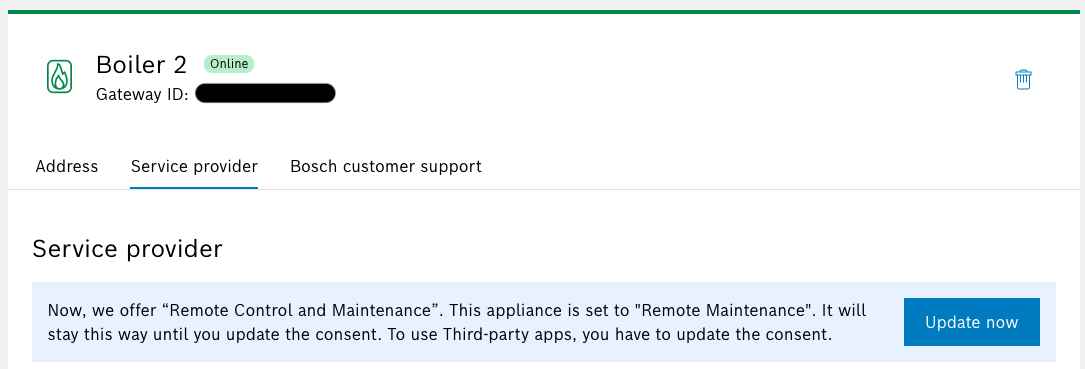
The remote control feature endpoints (e.g. GET /hvacs/{gatewayId}/heatingCircuits/{circuitId}) require an updated consent that was introduced in July 2024.
If an older consent exists, any calls to these endpoints will result in a 451 (Unavailable For Legal Reasons) status code.
A new consent that is given by an appliance owner is always based on the latest version. In order for an existing consent to be updated to the latest version, the appliance owner must once more accept the consent inside the Gateway Management Portal: