Access to Local API
The Local API provides a way for partner devices to interact with the gateway through a set of RESTful resources locally (via LAN).
To use the Local API some steps must be followed:
The following sections will guide you through the process of using the Local API.
Overview
The following sequence diagram shows in a general way the steps to use the Local API:
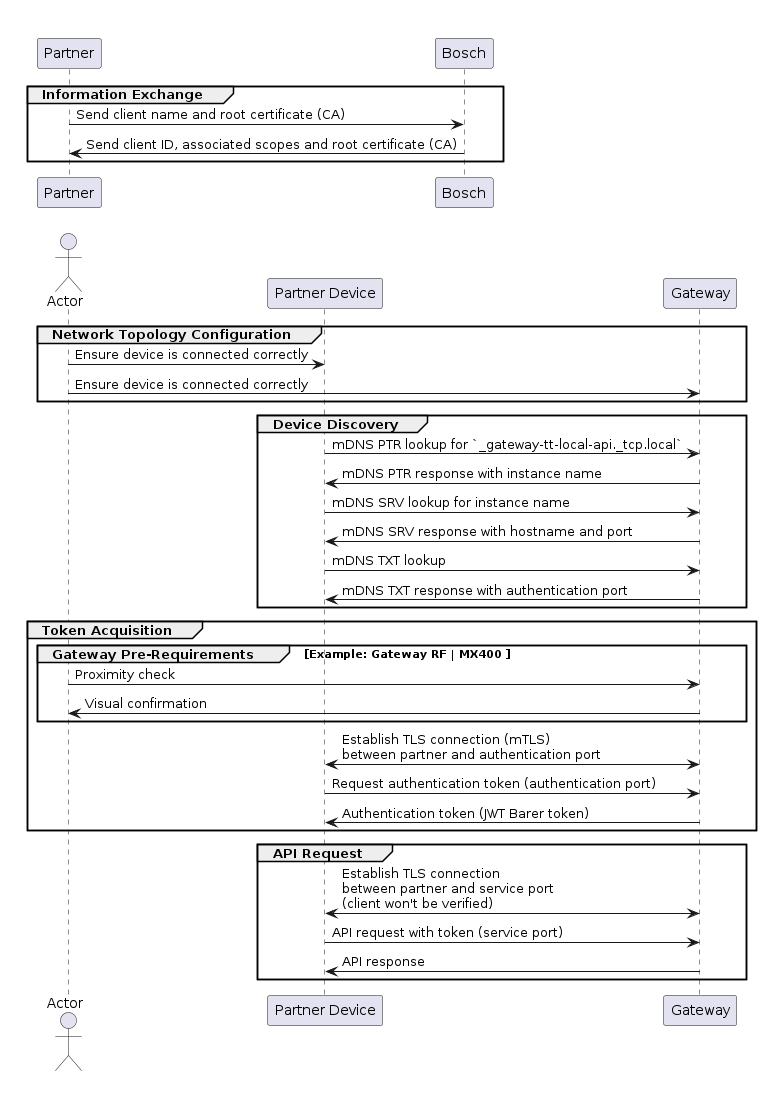
The following sections will provide more details about each step.
Information Exchange
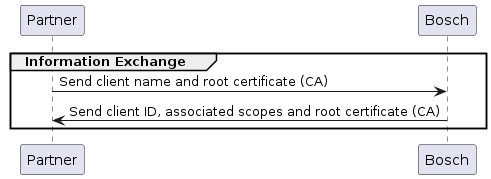
Before being able to use the Local API with your partner device, some information must be exchanged between the partner and the Bosch development team:
- The root certificate used to sign the client certificate must be provided to the Bosch development team so that it can be installed on the gateway as a trusted CA. This certificate must adhere to the requirements described in the Root Certificate Requirements.
The Bosch development team will create a client ID and associate it with the corresponding scopes. This information will be used by the partner to request the authentication token (see Token Acquisition section below).
Besides that, the Bosch development team will also provide the root certificate for the partner to install on their devices. This certificate can be used to validate the gateway's certificate during the TLS handshake (see TLS Handshake section below).
Network Topology Configuration
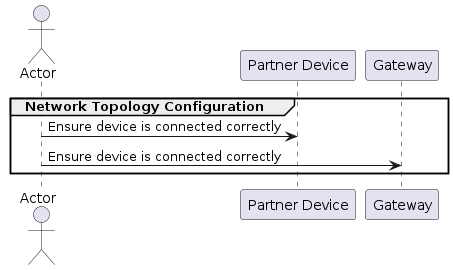
Before performing device discovery it is important to ensure that the gateway and the partner device are on the same network. The gateway supports zeroconf, so it can acquire an IP even without a DHCP server, i.e. it can be connected directly to a partner device.
In summary, these are the network topologies supported by the gateway:
Gateway connected to a DHCP server (router)
In this case, the gateway is connected to a router, either via Ethernet or WLAN (for WLAN the gateway must have been commissioned via the correspondent end user app first). The gateway will acquire an IP address from the DHCP server and the partner device must be on the same network.
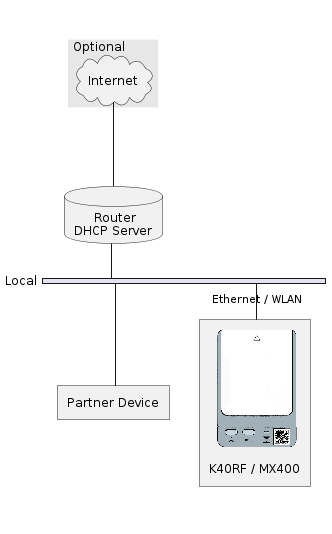
Gateway connected directly to a partner device (peer-to-peer)
In this case, the gateway is connected directly to the partner device via Ethernet. The gateway and the partner device must acquire an IP address via zeroconf.

Device Discovery
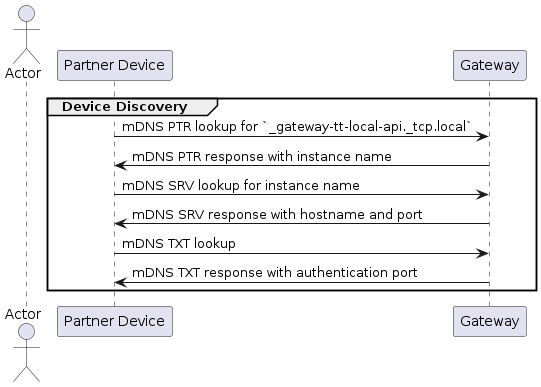
The partner device is able to discover the gateway via DNS-SD (DNS Service Discovery) and get the IP address / hostname of the gateway as well as the ports for requesting the authentication token and for using the API.
We recommend that the partner device uses the hostname instead of the IP address to make requests to the gateway.*
The DNS-SD service type for the gateway is _gateway-tt-local-api._tcp at the
local domain, i.e. the partner device should make a PTR lookup for
_gateway-tt-local-api._tcp.local to discover the gateway.
If any gateway is present on the network, the lookup will return PTR records
containing service instance names in the form of
<instance>._gateway-tt-local-api._tcp.local, where the instance is in the form
of <model>-<uuid>. For example, if the gateway is a K40RF with the UUID
101042019, the instance name will be
k40rf-101042019._gateway-tt-local-api._tcp.local.
From here the partner device can make an SRV lookup for the instance name to get the host and port information for using the Local API. Besides that, the partner device should also make a TXT lookup for the instance name. The TXT record (V1) will contain the following information:
txtvers: The version of the TXT record. Example:txtvers=1authport: The port for requesting the authentication token. Example:authport=8442model: The model of the gateway. Example:model=K40RFbrand: The brand of the gateway. Example:brand=Boschuuid: The UUID of the gateway. Example:uuid=101042019serial: The serial number of the gateway. Example:serial=99994370000527738114013
Token Acquisition
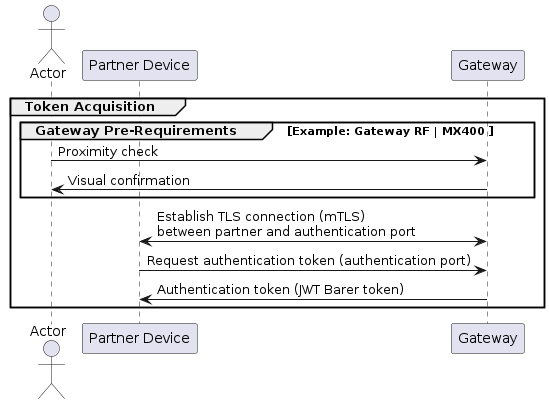
After getting the host and authentication port for the gateway's Local API, the partner device is able to request an authentication token, which is necessary for making requests to the API. This process is based on the OAuth 2.0 client credentials flow.
The process for requesting a token may have different pre-requirements depending on the gateway model, so please refer below to the specific section for the gateway you are interested in.
Pre-requirements for Bosch Connect-Key K40RF or Buderus MX400
To request a token for the K40RF or MX400 gateways, a proximity check must be performed physically. This is done by pressing both buttons on the gateway after the device has finished booting. The device will confirm the proximity check by lighting up all LEDs blue for three seconds.
After the proximity check is confirmed, the partner device has 1 minute to request the token. After this time expires or a request is made, the gateway will require a new proximity check, even if the request was unsuccessful.
TLS Handshake
The gateway requires the partner device to authenticate itself during the TLS handshake by providing a client certificate. This certificate must have been issued by a root certificate known by the gateway. This root certificate shall be provided by the partner to the Bosch development team so that it can be installed on the gateway in forehand. A successful connection requires TLS version 1.2 or higher and one of the following cipher suites: ECDHE-ECDSA-AES128-GCM-SHA256, ECDHE-RSA-AES128-GCM-SHA256, ECDHE-ECDSA-AES256-GCM-SHA384, or ECDHE-RSA-AES256-GCM-SHA384. Additionally, the certificate chain depth must not exceed 3.
For a successful TLS handshake it is required that the Gateway received a valid time through a connection to a NTP server.
We also recommend that the partner device validates the gateway's certificate.
Token Request
The token request is made by sending a POST request to the gateway's
authentication endpoint: auth/token. It uses
application/x-www-form-urlencoded encoding with the following parameters:
client_id: The ID of your client.client_name: The name of your client can be freely chosen by the partner's device. This name may be used by our Gateway to display to the customer which device is paired with it. Example:client_name=Partner Devicegrant_type: The grant type, which must beclient_credentials. Example:grant_type=client_credentialsscope [optional]: The requested scope of the token. You can also request multiple scopes separated by a white space. If you omit this parameter, your token we be granted with all scopes available for your client. Example:scope="service.read service.level1.write"
Example with curl:
export HOSTNAME=K40RF-aabbcc # hostname as advertised by DNS-SD
export AUTH_PORT=8442 # authentication port retrieved from TXT record
export BOSCH_CA=/path/to/bosch-ca.pem
export CLIENT_CERTIFICATE=/path/to/client-certificate.pem
export CLIENT_KEY=/path/to/client-key.pem # Can be the same as the certificate if it is a combined file
export CLIENT_ID=<client_id>

curl -X POST -v -k --cacert ${BOSCH_CA} --cert ${CLIENT_CERTIFICATE} \
    --key ${CLIENT_KEY} https://${HOSTNAME}:${AUTH_PORT}/auth/token \
    --header "Content-Type: application/x-www-form-urlencoded" \
    --data-urlencode "client_id=${CLIENT_ID}" \
    --data-urlencode "grant_type=client_credentials" \
    --data-urlencode "client_name=Partner Device"
The -k option is used to skip the certificate validation. This is necessary
because the curl tool won't be able to validate the hostname of the gateway
against the Common Name (AKA CN) of the certificate. Nevertheless, we recommend
that the partner device validates the gateway's certificate in their application.
To address this issue using curl, you can leverage libcurl with the
CURLOPT_SSL_VERIFYHOST set to 0. To generate a C file from the curl command
just remove the -k option and attach the --libcurl client.c option. This
will create a C file named client.c that uses the libcurl library to perform
the same request as your original curl command. Next, modify the generated C
file by adding the following line to set the CURLOPT_SSL_VERIFYHOST option to
0:
curl_easy_setopt(hnd, CURLOPT_SSL_VERIFYHOST, 0L);
Finally, compile the modified C file to create an executable.
The gateway will respond with a JSON object containing a JWT Bearer token. Example:
{
    "access_token":"<access_token>",
    "token_type":"Bearer",
    "scope":"service.read service.level1.write"
}
Troubleshooting the Token Request
If the token request fails, the gateway will respond with an error message. The most common errors are:
| Status Code | Troubleshooting |
|---|---|
| 400 | client_name or grant_type wrong or missing from request body |
| 401 | client_id wrong / request with not allowed scopes |
| 412 | Proximity check missing |
| 415 | Wrong content type. Expected: application/x-www-form-urlencoded |
| 500 | client_id missing / wrong auth method |
| 507 | maximum number of tokens reached (see known limitations) |
API Requests
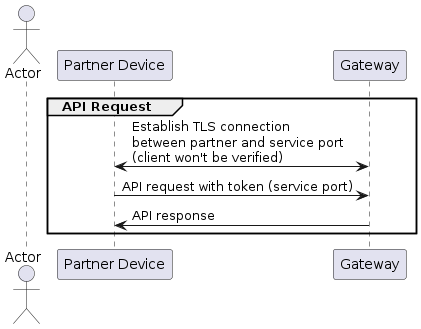
After acquiring the token, the partner device is able to make requests to the
API. The token must be included in the Authorization header of the request
with the value Bearer <access_token>. The gateway will validate the token and
authorize the request.
Example with curl:
export HOSTNAME=K40RF-aabbcc # hostname as advertised by DNS-SD
export API_PORT=8443 # port as advertised by DNS-SD
export BOSCH_CA=/path/to/bosch-ca.pem
export TOKEN=<access_token>

curl -X GET -v -k --cacert ${BOSCH_CA} \
    https://${HOSTNAME}:${API_PORT}/gateway/brand \
    --header "Authorization: Bearer ${TOKEN}"
The same considerations about the certificate validation as in the token request apply here.
The gateway will respond with the requested information. Example:
{
    "brand": "Bosch"
}
Known Limitations
Currently only 32 tokens can be issued by the Bosch Connect-Key K40RF and Buderus MX400 gateways. If the limit is reached, a factory reset of the gateway is required to issue new tokens.