Adjustment of Heat Pump Power
The "Adjustment of Heat Pump Power" provides a monitoring and control interface with which the heat pump can be monitored and influenced via a desired power setpoint by a HEMS (home energy management system).
It is one general interface allows easy control of flexibility shifts in the heating, hot water, and cooling modes. With this interface, the HEMS can request a "desired power", while the heat pump always ensures that the safety and comfort requirements are met.
This feature is not supported by all heat pump series. Specifically, it is unavailable for Liquid/Water heat pumps and cascade systems.
Resources
| Function | Unit | read | write | HMI menu / Resource |
|---|---|---|---|---|
| HEMS use case "Adjustment of Heat Pump Power" is used | Bool | x | x | Service -> System settings -> Manual commissioning -> Energy manager /heatSources/powerElecDesiredEnabled |
| State of compressor | Enum | x | - | Service -> Info -> Heat pump -> Heat pump -> status /heatSources/compressor/status |
| Current power of compressor | W | x | - | Service -> Info -> Heat pump -> Outputs /heatSources/compressor/powerElecActual |
| State of e-heater | Enum | x | - | Service -> Info -> Heat pump -> Heat pump status /heatSources/Source/eHeater/status |
| Current power of e-heater | W | x | - | Service -> Info -> Heat pump -> Outputs /heatSources/eHeater/powerElecActual |
| Current min. compressor power | W | x | - | Not in HMI /heatSources/compressor/powerElec/minPossibleEstim |
| Current max. compressor power | W | x | - | Not in HMI /heatSources/compressor/powerElec/maxPossibleEstim |
| Power control for modulating the HP in extended EM role (Also used as heartbeat of EM) | W | - | x | Not in HMI /heatSources/powerElecDesired |
| State of the energy manager mode in the heat pump | Enum | x | - | Service -> Info /heatSources/emStatus |
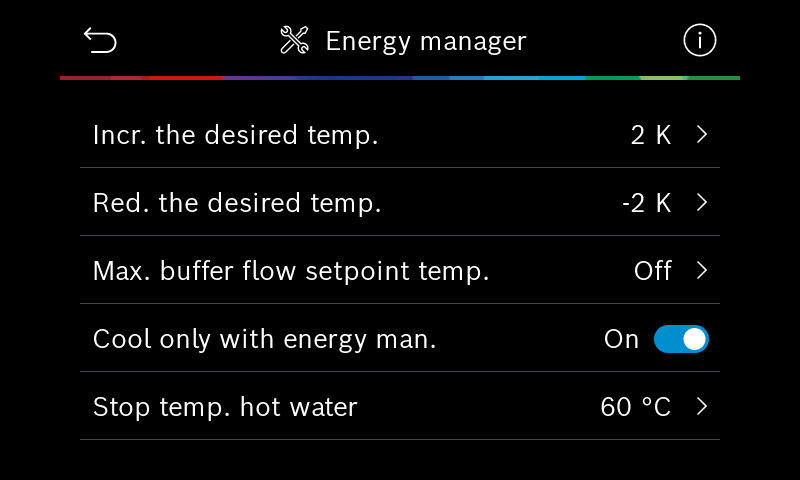
| Room Temperature Offset Heating in EM mode | K | x | x | Service -> System settings -> PV own consumption optimization /heatSources/em/pvRoomTempOffset |
| "Cooling only with PV" for EM mode | Bool | x | x | Service -> System settings -> PV own consumption optimization /heatSources/em/coolOnlyWithEmPower/enabled |
| DHW stop temperature in EM mode | °C | x | x | Service -> System settings -> Hotwater -> Temperatures /dhwCircuits/dhw1/emStop |
Details
Configuration
The presence of an energy manager must be configured in the heat pump system. Once this is done, the specific energy manager menu will be visible for users and the service in the HMI.
A HEMS can be configured in one of three ways:
- On HMI manually: The setting "Energy manager" can be switched to "yes" in "Service -> System settings -> Manual configuration". All dedicated menus are displayed, and settings can be made on the HMI (/heatSources/powerElecDesiredEnabled will be true).
Hint: After about 1 hour, a warning message will appear (A11/1183 - Connection to Energy Manager lost) until the EM sends its first flexibility request. This warning does not affect the normal operation of the heat pump. - Via HEMS Interface-1: The setting "Energy manager" can be switched to "yes" by the EM (/heatSources/powerElecDesiredEnabled) with the same behavior as onsite (On HMI).
- Via HEMS Interface-2: With sending of the first flexibility request by the EM (/heatSources/powerElecDesired), the setting "Energy manager" in the configuration menu will be changed to "yes" automatically.
Hint: All dedicated menus are only displayed when the first flexibility request is sent
Menu/settings in HMI:
- Menu Service -> Settings -> Energy manager, all available settings for the extended HEMS operation mode can be accessed in this menu
- Menu User -> Overview tile -> More… -> Settings -> Energy manager
- The corresponding info values in service and user levels:
Using the EM Interface
A special feature of this HEMS interface is the transparency of the current minimum required electrical power of the heat pump system and the current maximum electrical power of the heat pump system.
This results in an estimated power range between minimum and maximum power in which the heat pump can be modulated by a HEMS.
The minimal and maximal compressor power reflects the current power range of the heat pump system, which is updated continuously.
To perform a load shift using an HEMS, a power setpoint (/heatSources/powerElecDesired) must be sent to the heat pump, which lies between the minimum and maximum power. Based on the HEMS's power setpoint, new setpoints are then calculated internally for heat pumps, and EM mode is activated.
The minimal compressor power estimates the electric power needed for the standard comfort requests. This minimal power can be zero if the comfort requirements (room and hot water temperature) are already fulfilled. Otherwise, it will contain values greater than zero, which is the estimated power that the heat pump would consume without energy management.
The maximum compressor output estimates the maximum electrical output that the heat pump system can consume when all flexibilities are utilized. This maximum power is always greater than the minimum power and can also be zero if all comfort requirements are met and no further flexibility is available. The system can be optimized using its energy manager parameters (room temperature increase, EM Stop DHW temperature, …) to influence the maximum power.
It should be noted that these are software-calculated estimates!
There is no accuracy guarantee and can fail in special modes or more dynamic operations.
The partner HEMS can send a power desired value (/heatSources/powerElecDesired) and the heat pump switches seamlessly in this EM mode and the compressor tries to follow the power desired value.
If the HEMS is connected to the heat pump and configured on the heat pump, the power desired signal must be transmitted periodically. We recommend sending a power control value of 0 Watts if you want only a heartbeat, and sending a power request between minimal and maximal power, if you want to increase the power consumption of the heat pump for load shifting (/heatSources/powerElecDesired).
If the heat pump does not receive a value from the HEMS for more than 4 minutes, the heat pump will revert to the mode without a HEMS. Once the power value is sent again, the EM system will be registered in the heat pump again (see configuration). This guarantees robust heat pump operation in case of disturbances in the HEMS.
The operation of the e-heater is independent of the HEMS. Its functionality is determined by the heat pump's internal control strategies.
The state of heat pump in EM mode (/heatSources/emStatus) returns one of the states:
- not connected -> Power desired not sent for more than 4 minutes
- inactive -> Power desired sent as 0 Watt (HEMS connected, no trigger by HEMS)
- active for heating or hot water -> This state is reached, if the compressor is running in a Power desired sent > 0 Watt -> This status is achieved when the heat pump is running in EM mode with an increased compressor power to the standard mode.
The current power and state of the compressor (/heatSources/compressor/powerElecActual and /heatSources/compressor/status) and e-heater (/heatSources/eHeater/powerElecActual and /heatSources/eHeater/status) can be used as indications about this heat pump information in the partner HEMS app.
Example for Compressor Operation
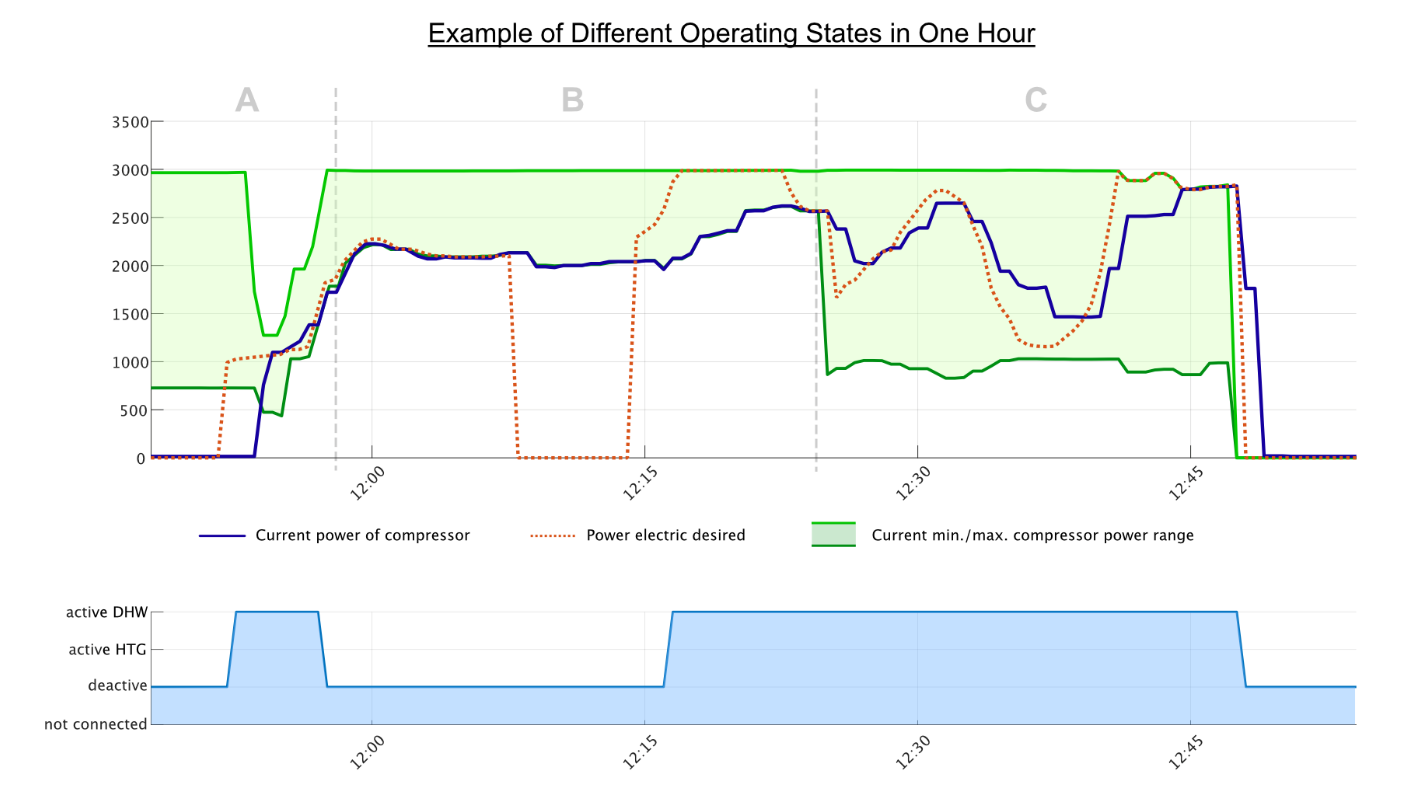
Phase A
In the beginning, the compressor is off, and the heat pump offers an estimation of a min and max compressor power (green zone). The HEMS then sends a desired power, and the compressor starts for this energy manager request.
During the start phase of the refrigerant circuit, the min. and max. compressor estimation is updated continuously. In normal operation, it may take up to 8-10 minutes to achieve stable operation, depending on the environmental conditions and temperatures. Keep the desired power request stable during this phase.
Phase B
The compressor power follows the min. compressor power to reach the comfort requests by the standard user settings. Even if the desired output for the EM mode is temporarily reduced without reaching the customer settings, the heat pump remains in minimum power and shows stable operation.
Phase C
The power desired signal changes continuously and the compressor follows the requested power. It shows small deviations from the desired power caused by physical limitations. In the end, the min. (comfort) compressor power and the power desired by the HEMS are decreased to zero, and the compressor follows immediately.
Finally, when the compressor is running in a stable operation, the estimation is more accurate, and the compressor is more dynamic.
 Example for Heating Mode
Phase 1: The setpoint temperature has not yet been reached.
- The heat pump is running to meet the standard comfort requirements by heating or hot water.
- A HEMS cannot be used to turn off the heat pump. This is because the heat pump must be able to always provide a minimum level of comfort.
- A heat pump can be set to an increased operating temperature to increase its power consumption.
- The transition is seamless between the standard value and the value in the EM mode.
Phase 2: The setpoint temperature has been reached.
- The heat pump now regulates to the increased setpoint configured via roomTempOffSet, or the maximum permitted buffer tank stop temperature (e.g., 60°C) if requested by the HEMS.
Hint: Don’t use this offset configuration setting for controlling of the heat pump operation. - The heat pump is started, stopped, and modulated in the capacity range by the HEMS (/heatSources/powerElecDesired).
The number of starts and stops directly affects the compressor's lifetime. It is therefore essential to choose them deliberately. It is uncritical to switch to EM mode during compressor operation.
An optional buffer cylinder can only be overheated (with a maximum buffer cylinder temperature above the required supply flow temperature in the heating circuits), if all heating circuits are mixed (the heating circuit can control a lower supply flow temperature for the heating circuit). Without this additional component(s), the buffer temperature will be equal to the highest calculated heating circuit temperature
 Example for Cooling Mode
If the heating system is also designed for cooling, the cooling can be configured (/heatSources/em/coolOnlyWithEmPower/enabled) to be only used in the EM mode, e.g., only with PV surplus energy.
In addition, the cooling power can be limited to the power desired value (/heatSources/powerElecDesired).
This can significantly reduce the cost of cooling for the standard cooling comfort since the cooling demand and a high solar yield correlate.
This resource for the configuration of an increased set point during the EM mode shouldn’t be used for controlling the heat pump!
 Example for Hot Water Mode
Like the example described for the heating mode, when the heat pump is running in the domestic hot water mode, the minimum compressor power can’t be reduced by the HEMS below the minimum power possible (/heatSources/compressor/powerElec/minPossibleEstim). At the same time, the maximum possible power is also available. Both minimum and maximum power together span the possible power range of the compressor.
The energy manager can decide whether to start the EM mode and sends the maximal power for the EM mode to the heat pump (/heatSources powerElecDesired). The heat pump tries to produce hot water up to the DHW EM stop temperature (/dhwCircuits/dhw1/emStop) valid in EM mode (usually 60°C). This transition is seamless without starting or stopping the compressor.
Suppose the minimal compressor power is "0" but a valid maximum compressor is present. In that case, the customer's comfort requirements are met, and the HEMS can fully modulate the heat pump up to the maximum warm water stop temperature in EM mode. The HEMS can also turn off the heat pump when there is no PV surplus energy. If the minimal and maximal compressor power = 0, there is no storage capacity in the heat pump system.
The refrigeration circuit of the heat pump is an efficient, but also a slow electric consumer compared to a wall box or an electric battery.
Depending on different environmental conditions (temperature, humidity) and operating modes, it can take more than 10 min. before a "stopped" refrigeration cycle is in operation for an EM mode.
It should also be noted that any start of the refrigeration circuit beyond normal operation has a direct effect on the maximum life of the compressor.
Therefore, an EM mode is ideally used when the compressor circuit is still in operation and seamlessly switches to EM mode.
Additional starts, especially in cold and humid ambient air conditions, for a rather short EM mode with low load shifting effects should be avoided!
The compressor heat-up phase and defrost operation delay the start significantly and reduce the overall efficiency of the heat pump and shorten the expected life of the compressor.
For a robust operation, the heat pump runs for at least 10 minutes after the compressor is started, and pauses for at least 10 minutes after the compressor has stopped.
As additional protection, the heat pump will ignore more than 2 requests per hour from the HEMS!