Heating temperature control
Resources refrigerant circuit
These resources are related to refrigerant circuit heat pump resources.
| Function | Unit | read | write | HMI menu / Resources |
|---|---|---|---|---|
| Heating operation mode (off, auto, man) | Enum | x | x | User menu -> heating tile for HC 1...4 /heatingCircuits/hcX/operationMode |
| Cooling operation mode (off, auto, man) | Enum | x | x | User menu -> heating tile for HC 1...4 /heatingCircuits/hcX/cooling/operationMode |
| Control type of heat curve | Enum | x | x | Service -> System settings -> Heating / Cooling -> Heating circuit x -> Heating /heatingCircuits/hcX/controlType |
| Minimal outside temperature | °C | x | x | Service -> System settings -> Heating / Cooling -> System settings /system/minOutdoorTemp |
| Min. flow temperature of heat curve (lower limit) | °C | x | x | Service -> System settings -> Heating / Cooling -> Heating circuit x -> Heating /heatingCircuits/hcX/heatCurve/minFlowTemp |
| Design temperature of heat curve | °C | x | x | Service -> System settings -> Heating / Cooling -> Heating circuit x -> Heating -> Heating curve HCx /heatingCircuits/hcX/heatCurve/endpointTemp |
| Base temperature of heat curve | °C | x | x | Service -> System settings -> Heating / Cooling -> Heating circuit x -> Heating -> Heating curve HCx /heatingCircuits/hcX/heatCurve/basepointTemp |
| Maximal flow temperature of heat curve | °C | x | x | Service -> System settings -> Heating / Cooling -> Heating circuit x -> Heating /heatingCircuits/hcX/maxFlowTemp |
| Room temperature offset | K | x | x | Service -> System settings -> Heating / Cooling -> Heating circuit x -> Heating /heatingCircuits/hcx/roomTempOffset |
| Room influence | K | x | x | Service -> System settings -> Heating / Cooling -> Heating circuit x -> Heating /heatingCircuits/hcX/heatCurve/roomInfluence |
| Pump speed PC1 (pump is connected directly to the heat pump) | % | x | - | Service -> Info -> Heating circuit /heatingCircuits/hc1/pumpSpeed |
| Heating of heating circuit 1...4 | Enum | x | - | Service -> System settings -> Heating / Cooling -> Heating circuit x /heatingCircuits/hcX/heatingType |
| State of heating circuit pump 1…4 | Bool | x | - | Service -> Info -> Heating circuit x /heatingCircuits/hcX/pumpStatus |
| Setting for heating circuit is mixed (one-time setting during commissioning) | Bool | x | x | Service -> System settings -> Heating / Cooling -> Heating circuit x /heatingCircuits/hcX/mixedMode |
Details
The operation modes should not be toggled more than once within an hour to avoid a negative
effect on compressor run time.
The same recommendation applies to the settings for the heating curve and room temperature,
also to avoid excessive write operations that could impact the lifetime of the EEPROM memory in the
control unit.
Heat curve settings
The heat curve setting is a service setting and not accessible to the user. It directly affects energy consumption, efficiency, and comfort.
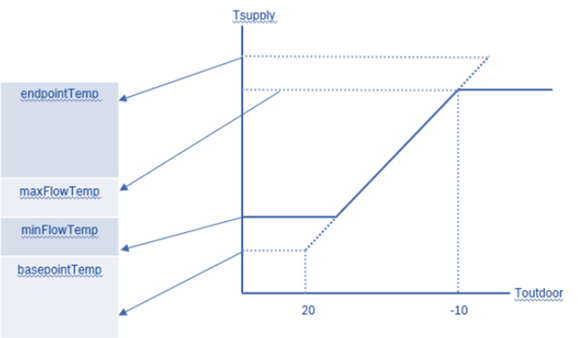
There are two control types (/heatingCircuits/hcX/controlType) of heating curve: "wdcoptimized" and "wdcsimplified".
-
"wdcoptimized"
This is the default heat curve, featuring a slight curvature in the mid-range of the outside temperature scale. This ensures a small increase in the supply flow temperature for enhanced comfort during the seasonal transition period. The base point (/heatingCircuits/hcX/heatCurve/basepointTemp) cannot be changed. Only the end point (/heatingCircuits/hcX/heatCurve/endpointTemp) is adjustable. -
"wdcsimplified"
This alternative heat curve is represented as a straight line, defined by:
A base point (/heatingCircuits/hcX/heatCurve/basepointTemp), with a minimum value of 22°C.
An end point (/heatingCircuits/hcX/heatCurve/endpointTemp).
Both values can be set to the same value, resulting in a flat heat curve.
Additionally, an "insert point" can be configured via the heat pump's user interface to adjust the heat curve during the seasonal transition period.
There are different ways to shift the heat curve in parallel:
-
Changing the room temperature setpoint: The heat curve is designed for a default room temperature of 21°C, as displayed on the HMI. Without a remote control, this value is calculated based on the heat curve setting. Adjusting the room temperature setpoint results in a parallel shift of the heat curve.
-
Using the "wdcsimplified" control type: The base point and endpoint of the heat curve can be adjusted to the same value. This also leads to a parallel shift, but without any visible change for the user. The room temperature remains unchanged – isn’t visible for the user.
-
Using the room temperature offset: This setting allows a parallel shift of the heating curve to compensate for deviations between the measured room temperature and the set value within a range of ±10K. Similar to the second method, this shift is not visible to the user and has no effect on the displayed room temperature. This could increase heating costs. The customer must be informed of this hidden change.
-
Using the room influence: If a remote control is installed in a suitable reference room, deviations in the reference room temperature will shift the heating curve in parallel. The higher the setting value, the stronger the weighting of the room temperature deviation and thus the maximum influence on the heating curve. Range: 1...10 K (default: Off; if activated: 3 K).