Hot water temperature control
This feature allows further optimize the heat pump load shifting for DHW, the adaption of the hot water requirements to suit the user’s needs, and taking advantage of the most advantageous tariff
Resources
| Function | Unit | read | write | HMI menu / Resources |
|---|---|---|---|---|
| DHW temperature top TW2 (optional) | °C | x | - | Service -> Info -> Hot water /dhwCircuits/dhwX/actualTemp |
| DHW temperature middle/bottom TW1 | °C | x | - | Service -> Info -> Hot water /heatSources/dhw/cylinderTemperature |
| Requested DHW level | Enum | x | - | User menu -> Hot water tile /dhwCircuits/dhwX/currentTemperatureLevel |
| Switch DHW operation mode | Enum | x | x | User menu -> Hot water tile /dhwCircuits/dhwX/operationMode |
| DHW start temperature Eco+ level | °C | x | x | Service -> System settings -> Hot water -> Temperatures /dhwCircuits/dhwX/temperatureLevels/eco |
| DHW stop temperature Eco+ level | °C | x | x | Service -> System settings -> Hot water -> Temperatures /dhwCircuits/dhw1/ecoStop |
| DHW start temperature Eco level | °C | x | x | Service -> System settings -> Hot water -> Temperatures /dhwCircuits/dhwX/temperatureLevels/low |
| DHW stop temperature Eco level | °C | x | x | Service -> System settings -> Hot water -> Temperatures /dhwCircuits/dhw1/lowStop |
| DHW start temperature Comfort level | °C | x | x | Service -> System settings -> Hot water -> Temperatures /dhwCircuits/dhwX/temperatureLevels/high |
| DHW stop temperature Comfort level | °C | x | x | Service -> System settings -> Hot water -> Temperatures /dhwCircuits/dhw1/highStop |
| Extra hot water (start, stop) | Bool | x | x | Service -> System settings -> Hot water -> Temperatures /dhwCircuits/dhwX/charge |
| Remaining time for extra hot water mode (when the mode was started) | min. | x | - | User menu -> Hot water tile /dhwCircuits/dhwX/chargeRemainingTime |
Details
Hot water temperature levels
The heat pumps offer three standard hot water levels for the user:
- Eco+ (eco)
- Eco (low)
- Comfort (high)
Each mode has its own optimized charging strategy. These are designed to meet different target temperatures, compressor power, delta T control, compressor delay times, and timers for the auxiliary e-heater for the best balance between comfort and efficiency.
With the user's permission, the operating modes can be used to coordinate hot water production with the most favorable tariff structure.
In the resource /dhwCircuits/dhwX/operationMode are followed values which can be switched:
- Off (no hot water production)
- Eco (equals Eco+)
- Low (equals Eco)
- High (equals Comfort)
- Own program (time program for hot water, which can switch between the 3 DHW modes)
The resource /dhwCircuits/dhwX/currentTemperatureLevel reflects the current active hot water mode.
These operation modes should not be toggled more than once within an hour to avoid a negative effect on compressor run time.
We recommend avoiding the time program for hot water. The time program is currently not supported in the interface.
Hot water temperature set points
All three levels have their own start and stop temperatures, which can be adjusted, but not by the user.
The start temperature represents the target hot water temperature for the respective hot water level.
The stop temperature defines the upper limit of the heating phase but must always be at least 8K higher than the start temperature. This ensures efficient hot water production while preventing excessive compressor starts and inefficient heating cycles.
Each level defines a complete charging strategy, including specific start/stop temperatures, a minimum compressor speed, and the charging delta (overtemperature) between the heat pump’s supply flow sensor (TC3), the electric heater (TC1), and the current hot water temperature (TW1).
The boundaries between the hot water levels are determined by the minimum and maximum temperature settings, as illustrated in the graphic. However, they may vary slightly depending on the specific heat pump variant and software version:
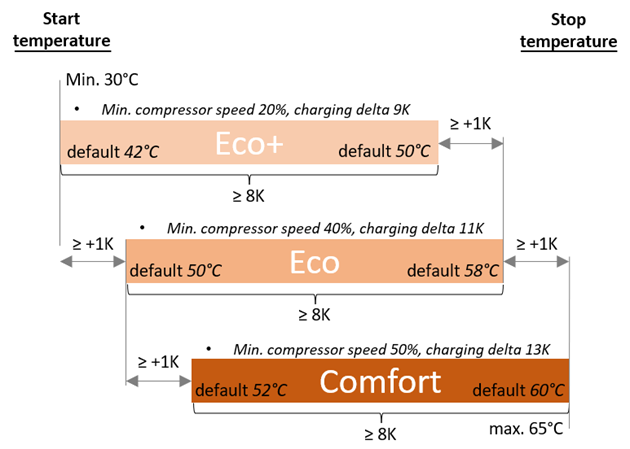
The hot water settings are service settings and must not be accessible to the end user. Start and stop temperature setpoints should not be modified by the algorithm, as this could negatively impact compressor runtime.
At hot water setpoints above 60°C, there is a risk of scalding for the user.
For temperatures above 60°C, it must be ensured that appropriate mixing devices are installed and that the end user is adequately informed about the associated risk.
The maximum temperature for setpoints via the REST API is 60°C. Note that for commercial use cases, even a requested 60°C may be insufficient for hygienic reasons.
Current hot water temperature
There are some technical issues to be considered when displaying the hot water temperature to the user.
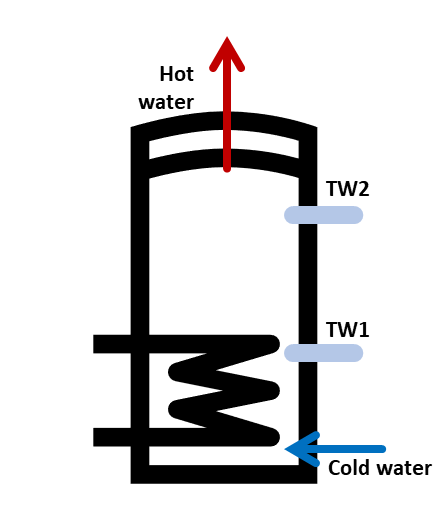
The current hot water temperature is measured with one or two sensors (TW1 or TW2) depending on the installed system. The optional sensor TW2 is in the ideal position for measuring the output temperature of hot water in a tank. It is placed in the top tank area, providing users with accurate readings.
However, TW2 is only available in hydraulic indoor units with integrated hot water tanks and in the hot water design tanks!
In all other cases (external and standard hot water tank) only the TW1 sensor is available, but its position in the tank is technically in the middle tank area and not optimal for the customer's hot water outlet temperature.
Immediately after a hot water charge is completed, the tank is fully charged, also the measured temperature on TW2 is close to the expected outlet temperature. As time passes and the consumer continues to use the hot water, the tank cools down from the bottom to the top due to the cold water flowing in. The TW1 sensor, due to the temperature stratification in a tank, will more quickly indicate a colder mixed temperature in the lower part of the tank, while there is still enough water at the expected outlet temperature in the upper part of the tank (but without the additional TW2 not measured).
The current hot water temperature is best measured with the TW2 sensor, if installed, otherwise the TW1. The same values are also displayed on the HMI in the system overview graphic to users.
Extra hot water
When "Extra Hot Water" is requested, the electrical heater is immediately allowed. The same charging logic as for Comfort mode is applied, but with a higher TC1 setpoint. This setpoint can be configured in the user interface under: "Service -> System settings -> Hot water -> Temperatures".
The DHW (Domestic Hot Water) cylinder is heated until the target temperature is reached at the TW1 or TW2 sensor. As long as the "Extra Hot Water" mode is active, the water is reheated as soon as the current tank temperature drops by 7K.