Common
These resources contain general system information for identifying, checking compatibility, displaying error messages, and calculating the heat pump's energy consumption.
Resources
| Function | Unit | read | write | HMI menu / API Resources |
|---|---|---|---|---|
| System identification | - | x | - | Service -> Info -> System components new: /system/basicInfo deprecated: /system/info |
| System brand name | - | x | - | Brand of the heatpump /system/brand |
| Error messages | - | x | - | Service menu -> Diagnosis -> Errors -> Active system errors /notifications |
| Cumulated consumption and production of the heat pump and e-heater | kWh | x | - | User menu -> Energy -> More -> Consumed energy -> Total -> Overall /heatSources/emon/totalConsumption |
| Cumulated consumption and production of the heat pump and e-heater for hot water | kWh | x | - | User menu -> Energy -> More -> Consumed (or Produced) energy -> Hot water -> Overall /heatSources/emon/dhwConsumption |
| Cumulated consumption and production of the heat pump and e-heater for heating | kWh | x | - | User menu -> Energy -> More -> Consumed (or Produced) energy -> Heating -> Overall /heatSources/emon/chConsumption |
| Operation pressure | bar | x | - | Service -> Info -> Heatpump -> Inputs /heatSources/systemPressure |
| System pressure range | bar | x | - | User menu -> System overview -> Operating pressure /heatSources/systemPressureRange |
| System date and time | Enum | x | x | User menu -> menu button -> Time of Day and Date /system/dateTime |
| State of Holiday mode | - | x | - | User menu -> Holiday title /holidayMode/activeModes |
| State of Away mode | - | x | - | User menu -> Away title /system/awayMode/enabled |
Details
System Identification
Use the system identification (/system/info) to get information on which components are installed and configured in the HVAC system.
The relevant system components are distinguished by the tokens and IDs in the response. Only the components that have been installed and configured are displayed in tokens and ID’s. The relevant tokens and values for each single component are listed in the tables:
| Component | Token | ID |
|---|---|---|
| Heat pump | 8 | 65281 |
| Indoor hydraulic unit | 8 | 8 |
| HMI (in indoor unit) | 16 | 253 |
| Gateway | 72 | 17 |
| EEBus module | 75 | 17 |
| Heating circuit 2* | 33 | 160/161 |
| Heating circuit 3* | 34 | 160/161 |
| Heating circuit 4* | 35 | 160/161 |
| Solar module** | 48 | 163/164 |
*160: mixer module MM100, 161: mixer module MM200
**163: solar module MS100, 164: solar module MS200
Every component (token and ID) contains the following relevant information:
| Label | Label in REST response | Example for heat pump component | Example for gateway as electronic component |
|---|---|---|---|
| Module Token | "Tok" | 8 | 72 |
| Module ID | "Id" | 65281 | 17 |
| Module sales name* | "ProductName" | AW 4 OR-S | "" |
| Product serial number* | "ProductSerialNumber" | 83703740000968738215701 | "" |
| Software version | "Ver" | 3.06.02-5.33-d510f849 | 10.02 |
| Electronic module name* | "ModuleHwIdentStr" | XCU_SRH | "" |
| Electronic module number | "ModuleSerialNumber" | 05703731009168750767802 | 25302791000098738806125 |
*Values will be empty for non-heat pump components, like the gateway or mixer module
Identification of hot water configuration
Heat pumps support one hot water system (hot water tank), which is part of the indoor unit. To determine if the hot water function is configured, check one of the hot water values. The resource is available only in a system that has a configured hot water system.
Compatibility check for HEMS role
Also, use the system identification (/system/info) to check the compatibility of the heat pump system and if the HEMS interface is available. Conditions for that:
- Outdoor refrigerant outdoor unit:
- Tok 16, Id: 65281
- Software version: "Ver": "3.06.02-5.33-d510f849", must be ≥ 7.10 (better ≥ 9.0.0)
- Product sales name "ProductName" reflects the sales name (see compatibility list)
- Indoor hydraulic unit:
- Tok 8, Id: 8
- Software version: "Ver": "23.06.02-5.33-d510f849" must be ≥ 7.10
- Product sales name "ProductName" reflects the sales name (see compatibility list)
- HMI in the hydraulic indoor unit:
- Tok 16, Id: 253
- Software version: "Ver": "47.10-NF_FIELD" must be ≥ 47.09
It is highly recommended to install the software version ≥9.6.0 on outdoor unit for improved power estimation. If the software is not up to date, please contact our service to update the heat pump software.
Error messages
The resource error messages (/notification) provide active warnings or failures as error codes. These notifications are displayed on the heat pump user interface, on the remote control, and in the user application. Multiple messages can be active.
A message contains the complete Home Comfort message structure:
| Name | Value | Description |
|---|---|---|
| Display code | dcd | (internal) Code for source and level indication |
| Cause code | ccd | Warning or error code |
| Cause code origin | orig | (internal) |
| Display level | dlv | (Info) Indicates, where is the failure present ("8" user level, "4" service level) |
| Fault class | fc | (Info) Internal code for the severity of the message (7-12 blocking, 13-16 standard, 17-20 maintenance) |
This resource provides an error message state for any indication in a HEMS partner app.
To ensure a unified and clearly defined user interface, it is essential to adhere to the specified display level definition. Only failure codes with a display level of dlv: "8" (user level) should be indicated in user applications.
Text descriptions for the messages are visible in the user interfaces (HMI, remote, App), service interfaces (Service App, Service portal) and partly in manuals.
Energy values
The total consumption resources contain the cumulated consumption for the heat pump and e-heater separately (values: "compressor", "eheater"). These send the electrical energy value in kWh with one decimal digit, as a cumulated lifetime counter since the first commissioning or a manufacturer reset of the gateway. The cumulated consumption of the heat pump also includes the necessary auxiliary energies such as:
- Heat pump fan
- Drip tray heater
- Central LIN pump PC0
- Heating circuit(s) LIN pump PC1, PC2 (optional, depend on the indoor hydraulic unit)
The value "outputProduced" transmits the thermal output of the heat pump completely in kWh (compressor, e-heater together).
The energy values are based on software estimations in the heat pump and cannot be used for billing energy costs!
The values may differ from those indicated by a calibrated electricity meter.
A preferred operation for renewable energy can lead to a lower efficiency value in the standard EMON analyses (more starts, operation with higher temperatures).
The energy values contain personal data. State of Away and Holiday mode resources infer user presence. Compliance with the General Data Protection Regulation (GDPR) is mandatory. The end user must be informed about the collection, processing, and purpose of this value, as well as their rights under the GDPR, before any use.
When the Heat Pump is connected to the internet, the date and time cannot be set via the local API. Modifying date or time through the local API will have impact on time programs, and other time-based features, as well as the energy monitoring.Additionally, already calculated energy and efficiency data will display a warning triangle, indicating inconsistent data across different timeframes (e.g., months, years) following a time/date change.
System pressure
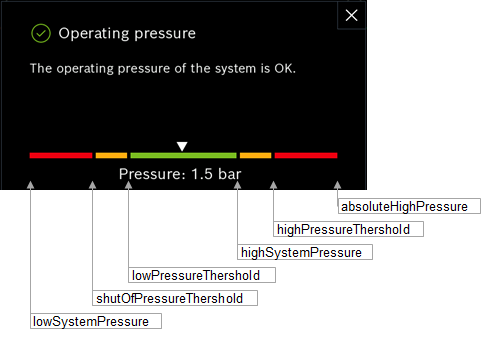
The current operating pressure in the heating system is read out in /heatSources/systemPressure.
The values in /heatSources/systemPressureRange can be used to partially or completely reproduce the graphical water pressure bar in the heating system. The threshold values are calculated and cannot be changed on the heat pump itself.